






 Italiano
 English
 Español
 Português
 Deutsch
 Français
Want to see more from Gocdkeys on Google?
You need to be signed in to your Google account.
"Will this game run on my PC?" is one of the last things people check before buying, and the answer is nearly always the same: a box of minimum and recommended requirements with two graphics card names in it. That tells you whether the game starts. It tells you nothing about how it will play.
That gap is what our system requirements and FPS section is for. Pick your graphics card and you get the frame rate you will actually see, measured on a test bench wherever a benchmark exists and said out loud wherever one does not.
What do minimum requirements actually tell you?
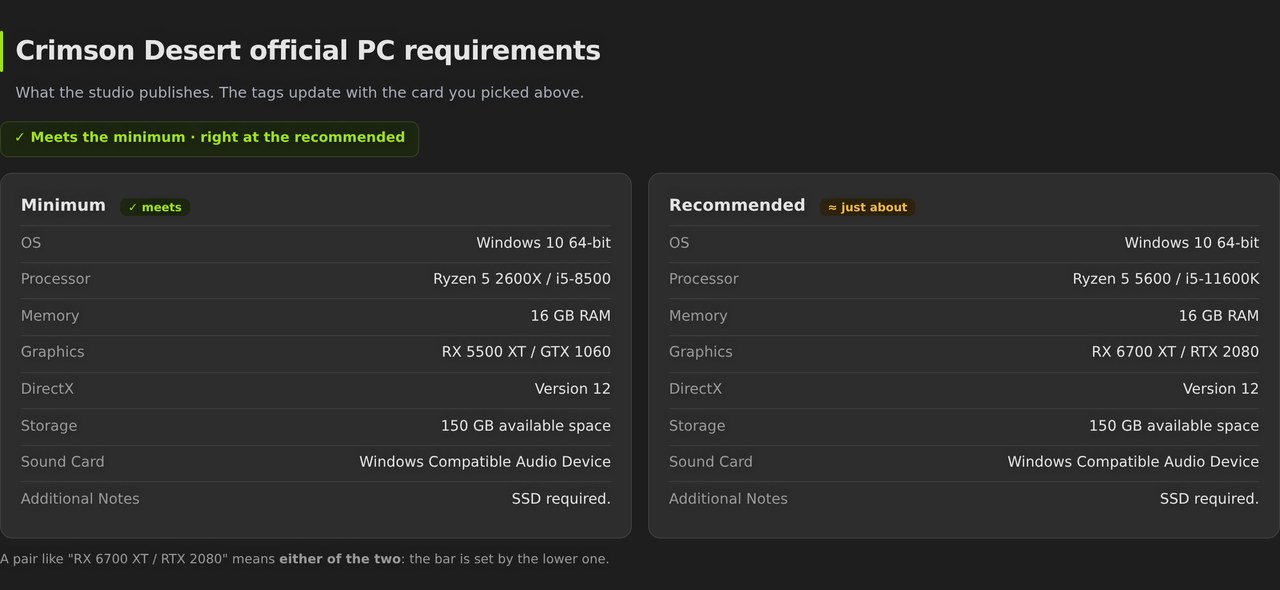
That the game opens. Not much more. The minimum tier is the setup where the studio guarantees the game runs and is playable, usually at 1080p with quality turned down and, more and more often, with upscaling switched on. The recommended tier aims somewhere else: that it looks and moves the way it was designed to, roughly 60 FPS.
Everything you actually wanted to know sits between those two boxes. Whether your card gives you 45 FPS or 90. Whether you will have to come down from Ultra. Whether 1440p drops you under 60. Official requirements answer none of it, because they were never written to.
Where do our FPS numbers come from?
From benchmarks, not from a formula. 202 games have measured FPS card by card, at 1080p, 1440p and 4K, and what you see there is a real run of that game on that card. Each of them has its own page, and the section is 626 pages in total, one per game.
The other 424 have no benchmark, and we do not invent one. They show the official requirements plus a verdict that compares your card against the one the studio asks for. The hub's search covers 6,215 games with published requirements, so even a game without its own page still gives you a verdict.
That distinction is the point, and it is printed on the page itself: measured figures are in bold, and anything derived from the quality ladder is flagged with a "≈". When your card falls outside everything that has been tested, the page says so instead of filling the hole with a number.
Crimson Desert on an RTX 3060: how to read the answer
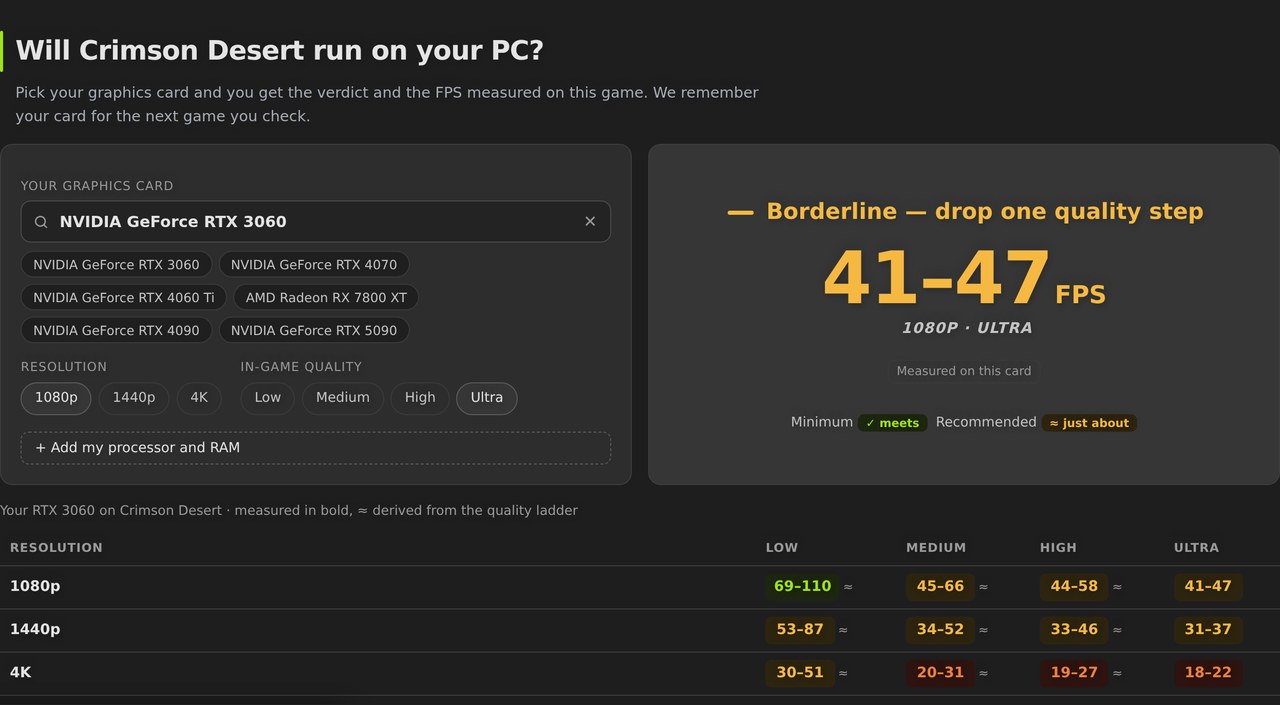
Pick the RTX 3060 and the whole answer lands at once: 41-47 FPS at 1080p on the highest quality, measured with that same card on this game. The verdict is not a yes or a no — it is "tight: drop one quality step", which is the part you can act on. Underneath sit the tags against the official specs: it clears the minimum and it just about touches the recommended.
Change resolution or quality and the number changes, because these are separate readings and not one figure scaled up and down:
| Resolution | Low | Medium | High | Ultra |
|---|---|---|---|---|
| 1080p | 69-110 ≈ | 45-66 ≈ | 44-58 ≈ | 41-47 |
| 1440p | 53-87 ≈ | 34-52 ≈ | 33-46 ≈ | 31-37 |
| 4K | 30-51 ≈ | 20-31 ≈ | 19-27 ≈ | 18-22 |
The bold column is the measured one. The rest come off the quality ladder, which is why they carry the "≈": they are a range, not an exact figure. Read practically, a 3060 plays this game comfortably at 1080p one step down, hangs on at 1440p with quality low, and has no business at 4K.
The game-wide table fills in the other half of the context: of the 31 cards measured on Crimson Desert, 27 clear 60 FPS at 1080p, 20 hold them at 1440p and only 5 keep them at 4K. What decides whether you need a new card is the resolution you play at, more than the game itself.
How much do you gain by lowering quality?
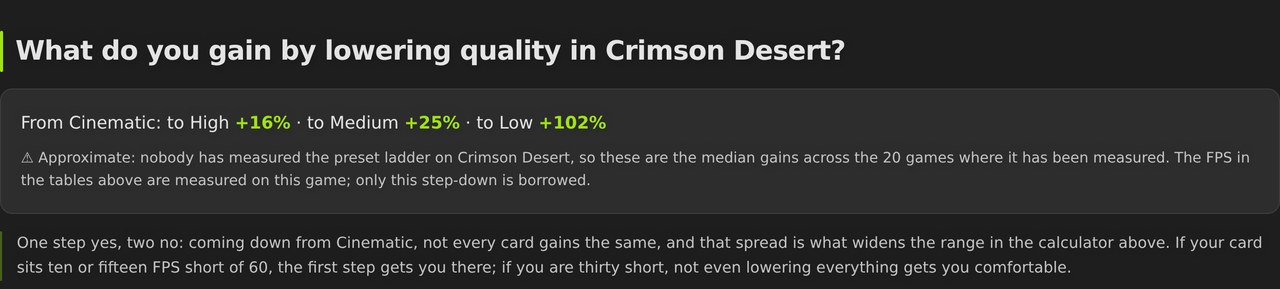
On Crimson Desert, coming down from the highest preset — which this game calls Cinematic — +16% to High, +25% to Medium, +102% to Low. The first step is almost always the one worth taking, because it gets you near 60 with barely a visible change. Being thirty FPS short is a different problem: that is a trip all the way down to Low, and Low is where the game stops looking like the screenshots.
Here the page flags something most sites will not: that step is borrowed. The quality ladder has only been measured on 20 games, so everywhere else we use the median of those twenty and we say so right above the box. The FPS in the tables are always from this game; the only thing coming from elsewhere is how much one step down gives you.
What if your card is not in the table?
The checker places it between the two nearest measured cards and hands you the range it falls into. You will not get a made-up exact number — you get the values you sit between and whether that is enough. And if your card is above or below everything tested on that game, the answer is that we do not know, written in those words.
It happens for real. Some games only have a benchmark run on older hardware, and a current card simply falls outside the range that was tested. Saying so is more useful than estimating it, because in that situation an estimate has nothing to anchor itself to.
What else is on each page?
- Your processor. Crimson Desert has 29 of them measured, all with the same graphics card so the variable is isolated. The second column is the one that matters: how far up the card range it pays to go before the processor becomes the brake.
- Laptops. 19 laptop GPUs measured on this game, 5 of which clear 60 FPS at 1080p on the highest quality — with the caveat that the same chip behaves very differently in a 90 W chassis than in a 150 W one.
- VRAM and cores. A measured peak of 8.7 GB at 1080p and use of up to 12 cores. With 8 GB of video memory you are already at the edge of it; with 6 you will feel it.
- Upscaling. What DLSS, FSR and XeSS give on this specific game — the one lever that buys you frames without making you give up settings.
- Settings and stutter. What to change depending on your card's brand, and the three usual causes of micro-stutter.
- The price. If your machine runs it, the deal comparison for that game sits on the same page.
Where to find it
The full index lives at PC game system requirements, with a search box for the game and another for the card; we remember the card you picked for the next game you check. The example above is Crimson Desert: requirements and FPS, and if the verdict convinces you, you can buy Crimson Desert key with the verified stores side by side.
It is free, there is no sign-up, and there is nothing to install for it to detect your machine: you pick your card from a list and that is the whole setup.

Buying guides and price comparisons written alongside live prices from the stores verified by GOCDKEYS.