






 Italiano
 English
 Español
 Português
 Deutsch
 Français
Want to see more from Gocdkeys on Google?
You need to be signed in to your Google account.
Every time you set a price alert, answer a community survey or buy a game through our extension, GoCDKeys gives you tickets. They have one job: getting you into our free giveaways, where we give away games, gift cards and, now and then, software. And the rule worth remembering from the start is simple: the more tickets you put into a giveaway, the better your chances of winning it.
On top of that there is now a levels system. Every ticket you earn also counts as XP, and as you climb you unlock more tickets on your purchases, bonus tickets when friends buy, weekly missions and a better avatar border. Below is the whole thing: what tickets are for, how to get them, and what each level gives you.
What are GoCDKeys tickets for?
For entering giveaways. That's it, and it's the part that matters. Tickets (the red ones you see next to your avatar) are the only way in: there's no entry fee, and tickets aren't for sale, so nobody can buy their way to the top.
Here is what has been up for grabs recently, to give you an idea:
- Games, often recent releases: Crimson Desert and EA Sports FC 27 on PC, Wardogs, GTA 6 on Xbox.
- Gift cards for Steam, PlayStation Store and Xbox.
- Software every so often, such as a year of Microsoft Office 365.
Prizes rotate, so check the giveaways page to see what's open right now and how long each one has left.
The key idea: you decide how many tickets to put into each giveaway, and more tickets means a better shot at winning. Save up for the prize you really want, or spread your tickets across a few. Either way, the more you have to play with, the better.
How do the giveaways work?
Entering
- Log in to your GoCDKeys account.
- Pick a giveaway and choose how many tickets to put in. Each giveaway has a minimum entry and may set a maximum per person, shown on its page.
- The first time, tick the box to accept the rules.
You can only enter each giveaway once, but you can add more tickets while it's still open, and every top-up improves your chances. The tickets come off your balance as soon as you put them in.
What you need
- A real email address on your account. If you signed up with Steam, add one in your profile first, or the entry button won't let you through.
- To live in the US, Europe or the UK. Prize versions and regions may not work elsewhere, so if a winner lives outside those areas, the prize can't be delivered.
- One account per person. Multiple accounts get every linked account cancelled.
Picking the winner
Each giveaway needs a minimum number of participants. If it doesn't get there, it doesn't go ahead and you get every ticket back. If it goes well past the minimum, more copies are given away.
The winner is drawn at random, weighted by the tickets each person has put in: the more you've entered, the more weight you carry, although nothing is ever guaranteed. The exact formula is in the rules on the giveaways page. Nobody can win two copies of the same prize.
We publish the winner's username on the giveaway page and on our social channels (never their email). The winner has 72 hours to get in touch through our contact page, and we deliver the prize within 48 hours after that. If they don't reply in time, we draw again.
How do you earn tickets?
Most ways are free and take a couple of minutes. The up-to-date list, with what you've already done, is in Earn tickets in your profile. The main ones right now:
The profile splits them up. Do it once and forget it holds the one-off tasks: signing up, notifications, Discord, Telegram, social follows, Google, linking the extension, your Steam wishlist, My Gaming Profile and the app. Daily Missions are the ones you can repeat, such as price alerts and the “Share your opinion on:” box, where we suggest a few upcoming releases.
| What you do | Tickets |
|---|---|
| Complete a community survey, like the EA Sports FC 27 one: answer the questions, write your opinion, hit Finish | +120 in one go, whatever you answer |
| Fill in My Gaming Profile | +40 in one go when you finish it |
| Set up price alerts | +2 per new game, up to 20 a day |
| Share your opinion on upcoming releases, or review any game | +10 for each one we approve |
| Download the Gamecost app and sign in with your account | +250, once |
| Import your Steam wishlist | +40, once |
| Join our Discord or Telegram group, or follow us on X, Facebook or Reddit | +15 each, once |
| Turn on push notifications | +10, once |
| Pick GoCDKeys as a preferred source on Google | +30, once |
| Create your account | +5 |
Buying with the extension
This is where the big numbers are. If you buy a game at one of the supported stores with the GoCDKeys browser extension installed and linked to your account, you earn tickets based on how much you spend (minimum purchase €5):
| Purchase from | Tickets |
|---|---|
| €5 | 75 |
| €10 | 150 |
| €20 | 250 |
| €30 | 350 |
| €50 | 500 |
| €75 | 650 |
| €100 | 800 |
Purchases are checked before the tickets are released, which usually takes 24 to 48 hours. There's no daily or weekly cap on how many purchases count. Linking the extension to your account also earns you tickets, once.
Sharing your link
Your giveaway link earns you +2 for every visit and +30 when someone signs up through it (those 30 arrive once your friend enters their first giveaway or links the extension), up to 300 tickets a day between the two. When that friend makes their first confirmed purchase with the extension, you get another +100.
What are levels and XP?
Levels sit on top of tickets. The idea is to reward people who keep earning them, not just those sitting on a big balance.
- Every ticket you earn = 1 XP, and that XP is yours for good.
- Spending tickets on giveaways never costs you XP. Your level reflects everything you've earned, not what's left in your balance, so there's no reason to hoard.
- Almost everything counts. The exceptions are the bonus tickets you get for levelling up and the prize wheel. Sharing your link counts up to 500 XP a week (you still get all the tickets).
- Your history counts. You start with the XP from every ticket you've ever earned with us, wheel aside.
Your level updates within a minute of getting tickets. It can only go down if we remove tickets: a cancelled or refunded purchase, a fake referral or fraud.
And here's why it's worth caring about: a higher level means more tickets on every purchase and referral, and more tickets means more to put into the giveaways you want to win.
What does each level unlock?
There are ten levels. The first few come quickly; the top ones take real commitment. Each time you reach a new one you get a one-off ticket reward: if you ever drop and climb back, you don't get it twice. Jump several levels at once and you collect all the rewards in one go.
| Level | XP | Level-up reward | Purchase and Referral Bonus | Also unlocks |
|---|---|---|---|---|
| 1 · Rookie | 0 | – | – | Starting point |
| 2 · Player | 150 | 50 | +10% | Bonuses kick in |
| 3 · Gamer | 400 | 100 | +15% | Weekly missions |
| 4 · Hunter | 1,200 | 200 | +25% | Gold border |
| 5 · Pro | 2,500 | 350 | +35% | Premium green border |
| 6 · Veteran | 5,000 | 500 | +45% | Blue star border |
| 7 · Master | 10,000 | 800 | +60% | Glowing purple border |
| 8 · Elite | 22,000 | 1,200 | +75% | Premium level |
| 9 · Legend | 45,000 | 1,800 | +85% | Epic gold border |
| 10 · GOCDKEYS Master | 80,000 | 3,000 | +100% | Double tickets on every purchase |
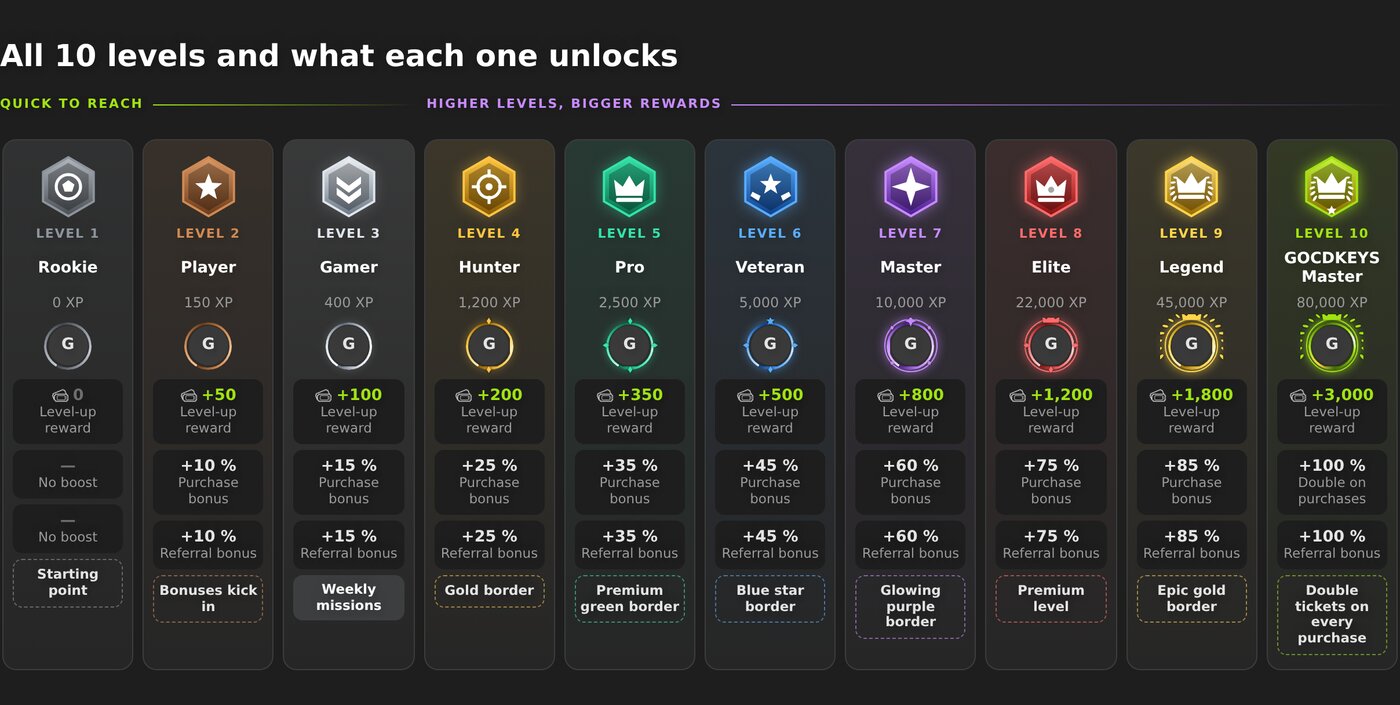
Add up every level-up reward and you get 4,925 tickets on the way to the top.
Purchase Bonus
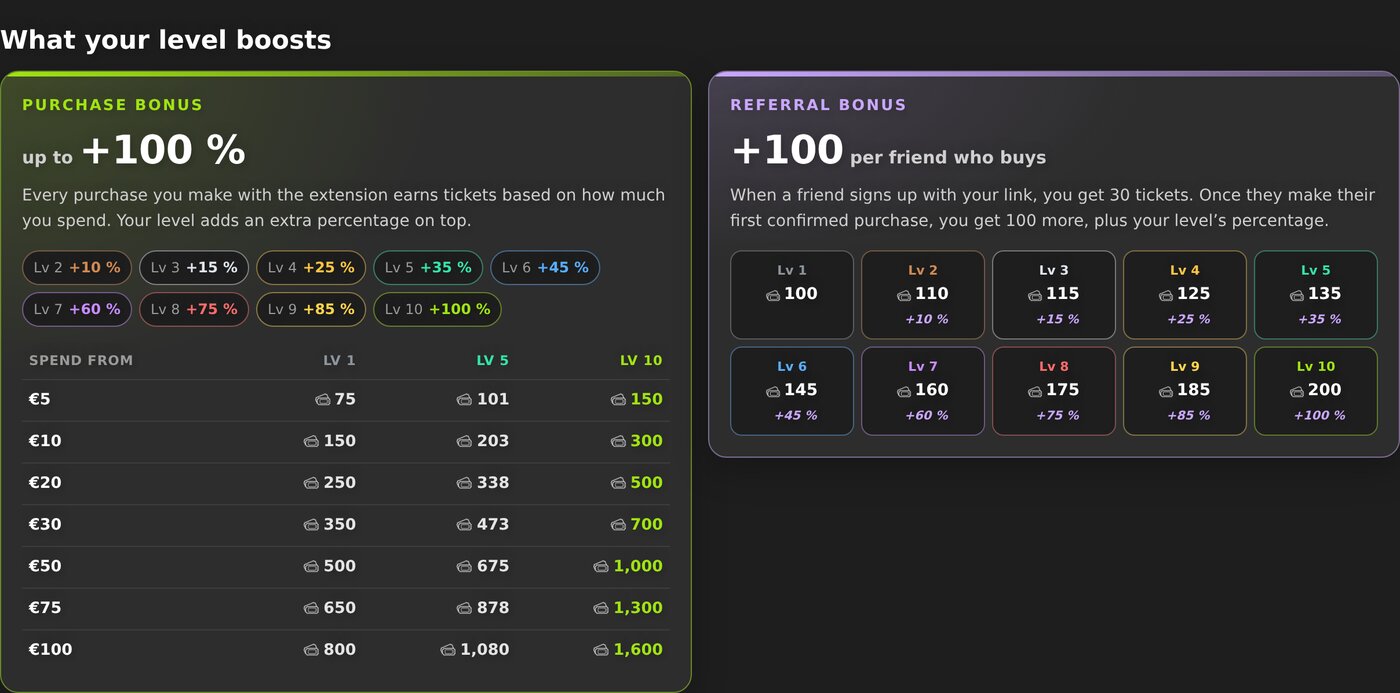
Your level adds a percentage on top of the tickets from each extension purchase, based on the level you were at before that purchase: from +10% at level 2 all the way to double tickets at level 10. A €20 purchase gives 250 tickets; at level 5 (+35%) you get 88 more, 338 in total. A €100 purchase gives 800 tickets at level 1 and 1,600 at level 10. Those extra tickets earn XP too.
Two caps keep levels fair: purchases add up to 1,500 XP a month at most (you still get every ticket, no cap there), and each giveaway takes up to 2,000 tickets per person; once you hit that, we point you to another open giveaway. Game reviews earn tickets for up to two a day; the ones you write in the weekly mission surveys don’t count towards that limit.
Referral Bonus
When a friend signs up with your link you get 30 tickets. When they make their first confirmed purchase, you get 100 more plus your level's percentage: at level 5, that's 135.
Weekly missions from level 3
At level 3 · Gamer you unlock weekly missions: up to five community surveys a week. Three are about games that have just come out, picked to match the games and platforms you play; the other two cover the most anticipated upcoming releases. Your picks stay the same all week.
You do each one on the game's price page: answer the questions, write your opinion and hit Finish. That's 120 tickets in one go per survey, whatever you answer. Complete all five in your week and you also get a 300-ticket bonus, so up to 900 tickets a week. The bonus doesn't add XP; the five surveys do, 600 XP. Below level 3 you can see them, but they're locked and don't pay out.
Avatar border
Your avatar border changes with your level, going gold at level 4, then premium green, a blue star, glowing purple, epic gold at 9 and an animated border at 10. It shows on your profile, on your comments on game pages, in the live activity feed on the giveaways page and in the profile carousel of the community surveys.
Where can you see your level?
- In the header: the ring around your avatar is your progress bar, with your level number on it. Hover over it to see your level, its name and how much XP you have left. Click it and the account menu opens with your level and its name (a link to the levels page), an XP bar showing how much is left to the next level, your tickets, active giveaways and your Purchase bonus, plus links to How levels work, My purchases, Profile and Log out.
- In your profile: your XP, the perks you've got now, what the next level brings and all ten levels laid out.
When you level up, a notice pops up on the site with the tickets you've just earned.
Quick answers
Do I lose XP if I spend my tickets? No. Put them into as many giveaways as you like; your level stays where it is.
Does more XP give me better odds in the giveaways? Not directly. What counts in a draw is how many tickets you put in. But a higher level gets you more tickets from purchases and friends, and those tickets are what give you more chances.
Do my old tickets count? Yes. You start with the XP from everything you've earned so far, apart from the prize wheel.
Can I buy tickets? No. They're earned, never sold.
If I drop a level and climb back up, do I get the reward again? No, each level reward is paid once per account.
The short version: earn tickets, put them into the giveaways you care about, and remember that the more you put in, the better your chances. Levels just make sure the people who keep at it get more to play with. Start in Earn tickets and see what's open on the giveaways page.

Buying guides and price comparisons written alongside live prices from the stores verified by GOCDKEYS.