Adobe Creative Cloud All Apps: Price, Plans and How to Activate Your Subscription
2026-02-13 11:37:18 | Written by
Alfred
What Is Adobe Creative Cloud All Apps?
Adobe Creative Cloud is Adobe’s most complete subscription plan, bringing together all its professional creative applications under a single membership. With one license, you can access tools such as Photoshop, Illustrator, Premiere Pro, After Effects, InDesign and many others, without purchasing each program separately.
It is designed for graphic designers, video editors, photographers, content creators and agencies that need to work across multiple formats within the same ecosystem. All applications are fully integrated, making workflows smoother and improving overall productivity.
What’s Included in the All Apps Plan?
The All Apps plan gives you full access to Adobe’s entire creative suite. You can retouch images, design branding materials, create layouts, produce animations or edit professional videos without switching platforms.
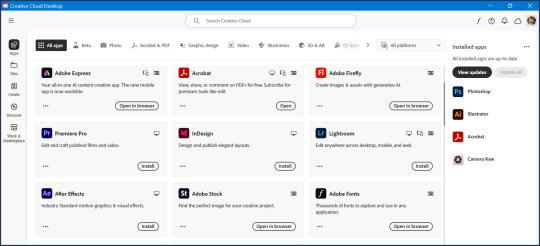
Everything is managed through the Creative Cloud desktop app, where you can download, update and install each program according to your needs. This flexibility allows you to move between different projects without technical limitations.
Differences Compared to Other Adobe Products
Not all Adobe products serve the same purpose. Single-app plans, such as Photoshop or Premiere Pro on their own, are more affordable but limit you to just one application.
Solutions like Adobe Express are focused on quick online content creation using templates, mainly for social media and marketing purposes. Acrobat products, on the other hand, are centered around PDF management and document editing rather than creative production.
Creative Cloud All Apps is the most complete and professional option within Adobe’s catalog, ideal for users who need unrestricted access to the entire creative ecosystem.
Available Versions: 1 Month, 3 Months and 12 Months
On Gocdkeys, you can choose the subscription duration that best suits your needs. All versions provide exactly the same features; the only difference is how long your access remains active.
If you need the software for a short-term project or want to test the full suite before committing long term, you can choose
Adobe Creative Cloud 1 MonthFor medium-length projects or temporary campaigns, a balanced option is
Adobe Creative Cloud 3 MonthsIf you work professionally throughout the year and are looking for better long-term value, the most cost-effective choice is usually
Adobe Creative Cloud 12 Months Subscription How to Activate Your Adobe Creative Cloud Key
Activating your subscription is simple. Once you receive your code after purchase, you need to redeem it on Adobe’s official website. Go to
https://redeem.adobe.com and sign in with your Adobe ID. If you don’t have an account yet, you can create one for free.
Enter the code exactly as provided and confirm the activation. The subscription time will automatically be added to your account. Then download the Creative Cloud desktop application from Adobe’s official website, sign in with the same Adobe ID, and you will be able to install any of the apps included in the All Apps plan.
If you already have an active subscription of the same type, the new code will extend your current plan without losing any remaining time.
Is Creative Cloud All Apps Worth It?
For occasional users, a single-app plan might be enough. However, if you regularly work with design, video or digital content, the All Apps plan offers significantly more flexibility. Having access to the full creative ecosystem allows you to adapt to any type of project without limitations.
Since the subscription is officially linked to your Adobe account, you will always have access to the latest software versions with automatic updates included.
Other Interesting Adobe Products
If you also work with documents or need more specialized tools, you may be interested in Adobe Acrobat AI Assistant, designed to enhance productivity when working with PDFs through intelligent features, or Adobe Express Premium, which focuses on fast and easy visual content creation for social media and marketing.
In upcoming articles, we will take a closer look at both Adobe Acrobat AI Assistant and Adobe Express Premium to help you decide which Adobe subscription best fits your needs and where to find the best price for each plan.

 ANALYSIS AND OPINIONS ON THE INSTANTGAMING STORE
2026-02-14 10:28:08
ANALYSIS AND OPINIONS ON THE INSTANTGAMING STORE
2026-02-14 10:28:08
 Playstation Plus for everyone and super cheap!
2026-02-15 07:55:43
Playstation Plus for everyone and super cheap!
2026-02-15 07:55:43
 Are CD Keys Legal? What You Need to Know Before Buying Digital Games in 2026
2026-02-05 08:28:20
Are CD Keys Legal? What You Need to Know Before Buying Digital Games in 2026
2026-02-05 08:28:20
 How we test each store before listing it on Gocdkeys: step‑by‑step methodology
2026-01-29 11:17:24
How we test each store before listing it on Gocdkeys: step‑by‑step methodology
2026-01-29 11:17:24
 Windows 11 Home vs Pro in 2026: What Really Changes and Which Version Should You Buy?
2026-02-12 08:48:17
Windows 11 Home vs Pro in 2026: What Really Changes and Which Version Should You Buy?
2026-02-12 08:48:17

 + 120 Tickets by link
I want more!
+ 120 Tickets by link
I want more!